PAeDocket
- 3.9
- Rating
- 500.00K
- Installs
- Free
- Price

 Analysis by App-foxy
When I need to check a Pennsylvania court case away from a desktop, I want something more focused than a general web search. PAeDocket is built for that narrow job: it is a free Books & Reference app from the Supreme Court of Pennsylvania that lets me search Pennsylvania court cases from a mobile device. After using it, I see its value less as a complete legal research platform and more as a practical first stop when I already have a useful case detail and need to look up a record quickly.
The app has been available since August 5, 2015, and its current version is 1.4. It works on Android devices running version 5.0 or later, carries an Everyone age rating, and has passed the half-million-install mark. Those details matter because this is not a new experimental tool; it is an established public-service app aimed at ordinary access to court information.
From a case detail to a useful result
When I have a case record in front of me, I find it useful to think beyond simply locating a result: the next step is deciding how to preserve and communicate what I found. I would keep the docket reference alongside the result and share the record’s identifying details without turning them into a legal conclusion. That careful handoff matters even more when the lookup is part of a larger decision.
You May Also Like

 Blood Strike: 2.5 Anniversary
Blood Strike’s Loadouts Turn Every Drop Into a Tactical Gamble
A close look at Blood Strike’s custom loadouts: how fast access to signature weapons reshapes its battle royale rhythm, rewards preparation, and narrows the gap between fights.

 Pandora - Music & Podcasts
Pandora’s Music Is Easy to Start, but Harder to Recover
Pandora’s strength is its low-effort path from a seed to a station. Its weak spot is how much confidence it asks you to place in connection, setup, and quiet recovery.

 8 Ball Pool
8 Ball Pool Is Built on Rivalries, Rematches, and Routine
A close look at the rivalries, rematches, shared routines, and unanswered safety questions that turn a quick pool match into a persistent mobile community.

 Samsung Music
Samsung Music’s Quiet Strength Is Playing What You Already Own
Its reach comes less from spectacle than from dependable access to a personal library. That simplicity is both the app’s strongest retention engine and its ceiling.

 AccuWeather: Weather Radar
AccuWeather Review: A Quick, Clear Forecast for Everyday Decisions
For everyday plans, the best forecast is the one you can understand quickly. AccuWeather makes rain timing, radar, and local conditions easy to act on, with a few trade-offs.

 Hill Climb Racing
Why Hill Climb Racing Still Turns Crashes Into One More Run
A tiny car, a bumpy hill and one more upgrade: Hill Climb Racing keeps resurfacing because its simple chaos makes every near-miss feel personal.
More From Our News Desk



Starting with the right piece of information
The most important part of using PAeDocket happens before opening the search screen. A court lookup is only as good as the information entered, so I would first gather whatever identifying detail I already have: a docket number, a party name, or another recognizable case reference. Starting with a vague name can create unnecessary work, especially when several people or organizations may appear in Pennsylvania records.
This is one of the app’s less obvious lessons. It is not a general-purpose legal question tool. I would not open it expecting an explanation of Pennsylvania procedure, a summary of legal rights, or advice about what to do next. Its job is retrieval. If I treat it like a reference index rather than a legal adviser, the experience becomes much clearer.
For a person who received a court notice, a family member trying to follow a case, a reporter checking a public record, or a legal professional needing a mobile lookup, that focused purpose is useful. I can begin with a known clue and move toward the relevant court entry instead of sorting through unrelated search-engine results.
Working through the search
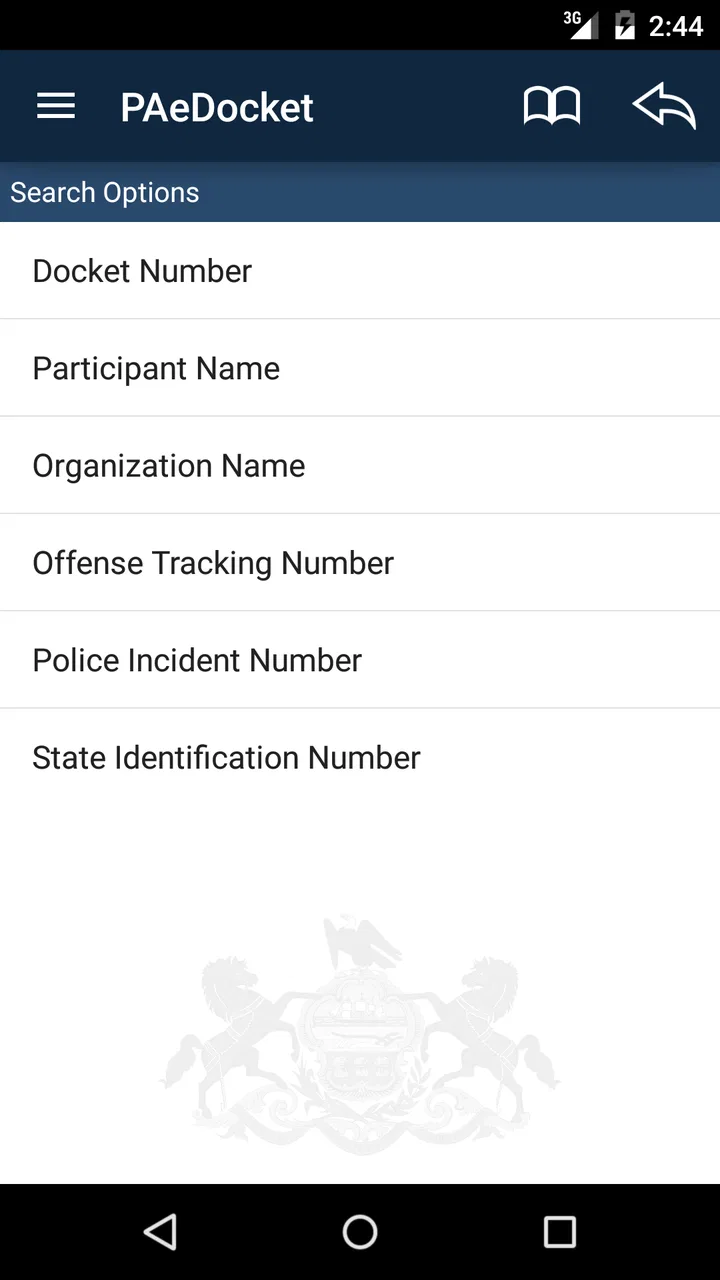
The basic workflow is intentionally direct. I open the app, choose the search path that matches the information I have, enter the case details, and review the returned record. The appeal is not a large collection of tools; it is the short distance between a question such as “What is the status of this Pennsylvania case?” and a court-specific search.
In practice, I would slow down at the entry stage rather than repeatedly submitting guesses. Names can be entered in different ways, and a small spelling difference can affect what appears. A docket identifier is usually a better starting point when it is available. If I am helping someone else, I would ask them to read the information directly from the notice instead of relying on memory.
That workflow also makes the app approachable for people who are not comfortable with legal technology. There is no need to build a research strategy across several databases before trying the first lookup. The app’s narrow scope reduces the number of decisions I have to make, which is exactly what I want when I am standing in a hallway, sitting in a waiting room, or responding to a question away from my computer.
Reading the result without overinterpreting it
Finding a case record is not the same as understanding every legal consequence attached to it. I would use the returned information as a factual checkpoint: confirming that I found the intended case, checking the identifying details, and noting what the record presents. I would then compare that information with the original notice or paperwork in front of me.
This is an important handoff. PAeDocket can help move me from uncertainty to a court record, but the next step may belong to a clerk, attorney, legal aid service, or the court’s own instructions. If a deadline, hearing, filing requirement, or personal legal decision is involved, I would not treat a quick mobile search as a substitute for professional guidance.
The app is most valuable when it prevents a simple information gap from becoming a larger delay. For example, if a relative sends me a Pennsylvania docket reference and asks whether I can locate the case, I can perform the lookup while traveling. I can report what I found, pass along the identifying information, and let the person decide whether they need to contact the court or obtain legal advice.
Handing the information to the next person
Mobile court searching often involves more than one person. A client may ask a legal assistant to check a record. A family member may ask another relative to confirm a case. A journalist may need to verify that a name leads to the intended docket before continuing research. In each situation, the handoff works best when I record the exact identifying details and distinguish between what the app displays and what I infer from it.
I would avoid sending a casual message such as “It looks fine.” That wording can turn a basic search into an accidental legal conclusion. A better handoff is specific: I found the matching case record, here are the details shown, and here is the point that still needs confirmation from the court or a qualified professional. PAeDocket supports that disciplined process because it gives me a focused place to begin.
Another useful habit is to repeat the search when the initial result seems surprising. If a name produces too many possibilities, I would refine the information rather than selecting the first familiar-looking entry. If nothing appears, I would check spelling, punctuation, and the source of the case reference before assuming the record is unavailable. This is a practical way to reduce false matches and missed matches.
What the app does well in everyday use
My strongest impression is that PAeDocket removes unnecessary distance from a Pennsylvania court lookup. A general browser search may lead to court pages, explanatory documents, news coverage, or unrelated people with similar names. This app starts with the relevant public-court purpose, so I spend less time deciding which result is trustworthy enough to open.
It is also easier to justify installing than a paid legal research service when my need is occasional and limited. The app is free, and its Everyone rating makes it suitable for a broad audience. That does not make it a replacement for professional databases, but it does make it sensible for a member of the public who needs to check a case without committing to a specialist subscription.
The public-service origin matters too. The Supreme Court of Pennsylvania is the developer, so the app feels directed toward access to Pennsylvania court information rather than toward advertising, legal lead generation, or a private commentary service. I still read results carefully, but the app’s purpose is refreshingly concrete.
Where it compares well with usual alternatives
Compared with a normal web search, PAeDocket is more focused. A search engine is better when I want news coverage, explanations of legal terminology, contact information, or commentary about a case. It is less efficient when my immediate goal is simply to search Pennsylvania court cases from a phone. The app wins that first lookup because it narrows the path.
Compared with a desktop browser, the app is more convenient when I am away from a desk or only need a quick check. A desktop remains preferable for extended research, copying information into a case file, comparing several sources, or reading lengthy legal materials. I see the mobile app as a companion for access, not as the ideal workspace for a complete investigation.
Compared with commercial legal research platforms, PAeDocket is much less ambitious. Professional services may offer broader jurisdictions, advanced filters, citation tools, document analysis, and research features that a public court-search app is not designed to provide. If my work depends on exhaustive legal research, I would choose the professional platform. If I only need to locate a Pennsylvania case record, paying for that larger system may be unnecessary.
Where the workflow breaks
The main friction appears when I do not have a reliable starting detail. Searching from a common name can become uncertain, and a failed lookup may reflect the quality of the input rather than a problem with the case itself. That means the app is not equally useful for open-ended discovery. It works best when I know what I am trying to find.
There is also a clear boundary between locating a record and receiving a complete picture. Someone who expects a mobile app to explain every procedural step, interpret a legal result, or replace contact with court staff may find PAeDocket too limited. That limitation is not a flaw in the narrow search concept, but it is a reason to set expectations before relying on it.
The version number is another practical consideration. PAeDocket is currently at version 1.4, and the minimum Android requirement is 5.0. On a compatible phone, that keeps the entry barrier fairly low, but people using older hardware or expecting the newest design conventions may find the experience less polished than a recently launched commercial app. I would judge it by whether it completes the court lookup reliably, not by whether it feels like a modern social or productivity app.
I would also avoid treating a result viewed on a phone as the final word in a time-sensitive matter. If the information affects a hearing, filing, custody issue, financial obligation, or another serious decision, I would use the app to orient myself and then confirm the next action through the appropriate official or legal channel. That extra step is especially important when another person will rely on what I report.
Who should use it, and who should skip it
PAeDocket is a good fit for Pennsylvania residents, families, journalists, students, and legal workers who need a quick mobile case search. It is particularly useful when the task is specific: verify a docket reference, locate a known case, or check a court record while away from a computer. Its free price also makes it reasonable for occasional personal use.
I would recommend skipping it if the real need is nationwide research, legal advice, document drafting, deep case-law analysis, or a searchable library of commentary. A general browser may be better for learning what a court term means, while an attorney or legal aid organization is better for deciding how to respond to a legal problem. The app can start the process, but it should not carry responsibilities it was not built to handle.
My final assessment after following the full workflow
PAeDocket succeeds because it keeps one useful journey short: I begin with a Pennsylvania case clue, search from my phone, inspect the matching record, and hand the verified identifying details to the person or professional who needs them next. That is a modest goal, but it solves a real problem when I do not have a desktop nearby.
Its weaknesses come from the same focus. It is not a teaching tool, a substitute for legal counsel, or a broad research suite. Input quality matters, interpretation still requires care, and complicated matters may quickly move beyond the app. Still, for a free court-reference tool with an average rating of 3.9 from around 1.3 thousand ratings and more than 500 thousand installs, it has a clear place in my toolkit.
My recommendation is simple: install it if you occasionally need to search Pennsylvania court cases and already have a useful case detail. Use it as the first link in the chain, not the entire chain. For that specific mobile lookup, the app is practical, accessible, and easier to use than wandering through unrelated web results.
FAQs for PAeDocket
01What is PAeDocket used for?
PAeDocket is Pennsylvania’s official court-case search application. It allows users to look up publicly available docket information from participating Pennsylvania courts, including magisterial district courts, common pleas courts, Superior Court, Commonwealth Court, and Supreme Court records. You can search for cases, review docket entries, check basic case details, and follow updates without visiting a courthouse or using a desktop browser.
02Can I search for any Pennsylvania court case in PAeDocket?
PAeDocket provides access to many public Pennsylvania court records, but it does not guarantee that every case or document will appear in the app. Availability can depend on the court, case type, record status, and whether information is restricted by law or court order. Sealed, confidential, expunged, juvenile, or otherwise protected records may not be visible to the general public.
03How do I search for a case in PAeDocket?
After opening PAeDocket, you can generally search using information such as a participant’s name, docket number, or other available case details, depending on the court and record category. Enter information carefully and review matching results before selecting a case. Names can produce multiple results, so checking the county, court, case type, and filing details is important to identify the correct record.
04Is the information shown in PAeDocket official and up to date?
PAeDocket connects users with court docket information maintained through Pennsylvania’s judicial system, but updates may not appear instantly. Data can be delayed because of processing, court schedules, technical issues, or differences in how courts enter information. The app should be treated as a convenient public-information tool, not a substitute for certified court documents or direct confirmation from the relevant court.
05Is PAeDocket free, and does it require an account?
PAeDocket is generally available as a free public-service application, and ordinary case searches typically do not require users to create a paid subscription or account. However, standard mobile data charges may apply if you use cellular internet. Some records or court services may involve separate fees, and the app does not necessarily provide certified copies, legal advice, or complete downloadable case files.
Pros
- Searches federal case records by party
- attorney
- or docket number.
- Provides access to opinions
- filings
- judgments
- and case-related documents.
- Useful for tracking multiple cases from one mobile application.
- Official judiciary source improves confidence in the displayed information.
- Available on both Android and iOS at no additional cost.
Cons
- Coverage is limited to participating federal courts and available case data.
- Some documents may require separate downloads or have viewing restrictions.
- Search results can be difficult to refine for common names or broad queries.
- Updates may not appear immediately after a filing is submitted.
- The interface feels functional but less polished than commercial legal apps.

PAeDocket
Gallery